
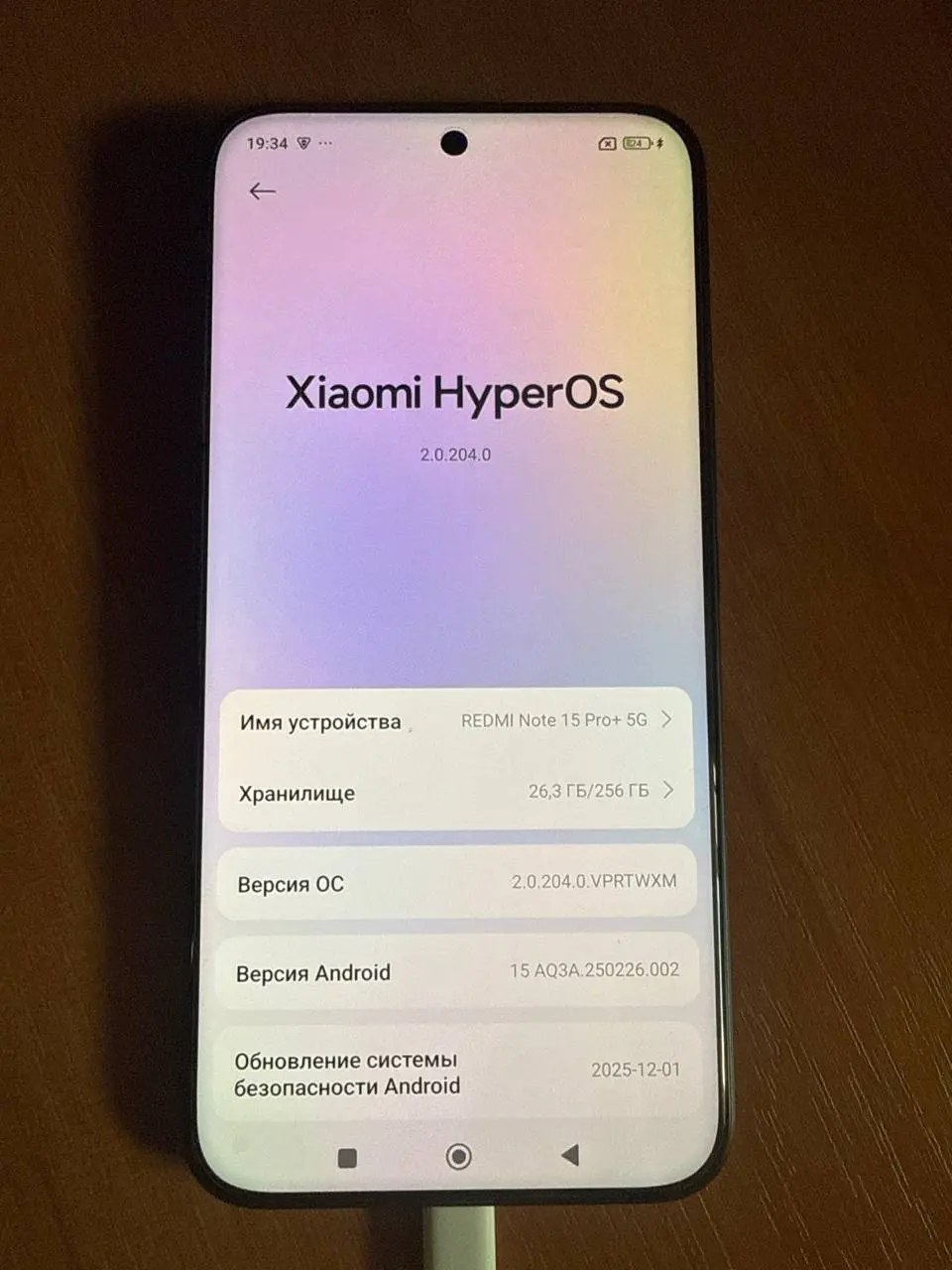
China ROM vs Global ROM is the question behind most problems with imported phones: missing Google Play, Chinese-only apps, no English in some menus, calls that stop working abroad, or OTA updates that never arrive. Before you change anything, you need to know exactly which software your phone runs and which market the hardware was built for. This guide shows how to check that on Xiaomi, Redmi, POCO, OnePlus, OPPO, Realme, Nubia and Red Magic devices, and what your options are once you know.
Why the difference matters
Manufacturers sell the same phone under two software lines. China builds ship without Google services and with local apps and cloud services. Global builds include Google Play, more languages and international OTA servers. Underneath, the hardware may be identical, slightly different (radio bands, NFC, charging) or tied to a different model number. The combination of hardware market and software build decides what is safe to install.
Xiaomi, Redmi and POCO: read the OS version code
Open Settings → About phone and tap the HyperOS (or MIUI) version to see the full code, for example OS2.0.6.0.VNCCNXM. It breaks down like this:
| Part | Example | Meaning |
|---|---|---|
| Version | OS2.0.6.0 | HyperOS 2 build number |
| 1st letter | V | Android version (T = 13, U = 14, V = 15) |
| 2nd–3rd letters | NC | Device code |
| 4th–5th letters | CN | Region of the ROM |
| Last letters | XM | Xiaomi build |
Common region codes are CN (China), MI (Global), EU (Europe / EEA), IN (India), RU (Russia), ID (Indonesia), TW (Taiwan), TR (Turkey) and JP (Japan). If the code shows CN, you are on China software.
Warning signs of a modified “fake Global” ROM installed by a reseller: the version code does not match any official release, updates never arrive, or the bootloader is unlocked when you bought the phone. These phones often break after a factory reset or an update.
OnePlus: model number and software name
OnePlus China models have model numbers that start with P and end in 110, such as PJZ110 (OnePlus 13), PKX110 (OnePlus 13T), PLK110 (OnePlus 15) or PLR110 (OnePlus Ace 6T). International models usually start with CPH. The software name is the second clue: ColorOS is the China line, OxygenOS the international line. Find both under Settings → About device.
China OnePlus units moved to OxygenOS can be affected by region lock. Read our OnePlus region lock guide and the status 2 explanation before flashing anything.
Realme and OPPO: check the model number
Realme China and international versions often have different RMX model numbers, for example RMX5010 for the China GT7 Pro and RMX5011 for the international model. OPPO China models commonly use P-prefixed codes (PJV110, PHN110) while international models use CPH numbers. Check Settings → About device → Version and compare the model number with the market list for your phone.
A China Realme or OPPO phone that displays “you are using a region customized phone” or blocks calls outside China is affected by region restrictions, not a broken SIM slot. See our Realme region customized phone guide.
Nubia and Red Magic
Red Magic and Nubia flagships often use the same NX model code in every market, so the software is the real indicator. China builds lack Google services and include China-only apps; Global builds ship with Google Play. Model-specific notes are in our Red Magic 11 Pro China to Global and Nubia Z80 Ultra China to Global articles.
Your options with a China phone
| Goal | Usual option | Main risk |
|---|---|---|
| Google Play only | Install Google services on China ROM (where supported) | Notifications and some apps may still be limited |
| Full Global experience | Convert to the official Global ROM | Wrong method can brick or region-lock the phone |
| Keep warranty and locked bootloader | Global ROM conversion without bootloader unlock (selected models) | Model and firmware version must be supported |
| Root or custom ROM | Bootloader unlock first | Banking apps and OTA may be affected |
| Calls blocked abroad | Region unlock service | Only for supported models and statuses |
Rules that prevent bricks
- Never relock the bootloader on a ROM from a different region than the phone shipped with.
- Check anti-rollback before installing an older Global build on a newer China build.
- Use official packages only. Repacked “Global” ROMs from forums are the most common cause of later failures.
- Note your IMEI and model number before you start; take a screenshot of About phone.
Get the right conversion service
NCUnlock converts China phones remotely, including several models that can move to Global without unlocking the bootloader. Browse Xiaomi Global ROM services (for example Xiaomi 15 Ultra and Redmi Note 15 Pro+), the OnePlus 15 China to OxygenOS service, or Red Magic 11 Pro Global ROM. Not sure which applies? Send your About phone screenshot through the contact page.
FAQ
Is a China ROM phone worse than a Global one?
Not in hardware quality. The difference is software, services and update channel.
Can I tell the version from the box?
Partly. Chinese-only text and the model number help, but the software code in About phone is the reliable check because resellers often reflash phones.
Will converting to Global ROM erase my data?
Usually yes. Back up before any conversion.
Does Global ROM change the IMEI or model number?
No. The legitimate conversion only changes software; IMEI and hardware model stay the same.
Comments
0 comments