
Firmware Unbrick OnePlus 14
Waiting Update…………. Coming soon
Qualcomm + Fastboot Driver
OPlusSupportSetupV2.7.2: Download
New Qcom Mtk Driver V4.0.1.6: Download
Qualcomm, MTK platform – USB driver installation
- Download the driver file from the network disk :
- Double-click to install (the default path does not need to be changed)
- Pop up a security window (always allow installation)
- Select restart the computer now
- Complete
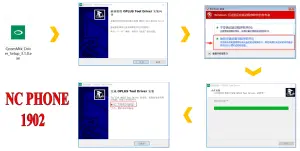
Qualcomm-MTK USB Driver
How to Unbrick OnePlus 14 with EDL Mode
- Download, Extract ROM File & tool in same folder
- Qualcomm_Drivers_QDLoader driver on your computer
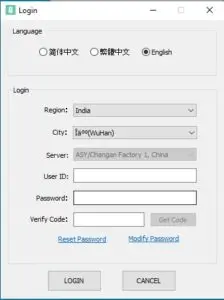
- Login OplusFlashTool.exe
- Select Firmware
- Click “Start” button
-
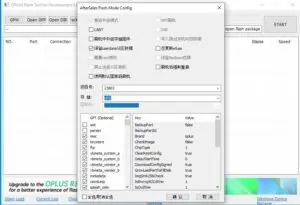
How to Unbrick OnePlus OnePlus 14 firmware - Conect Phone to PC, Enter EDL Mode
-
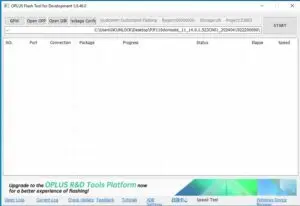
How to Unbrick OnePlus OnePlus 14 flashing - Wait until success, once done. Unplug device and switch it ON >>>Done All
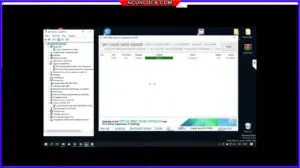
How to reboot EDL OnePlus 14
- Connect one end of the USB cable to your PC.
- Then connect the other end to your device.
- Now press and hold the Volume Up, Volume Down, and Power keys. after the software launches, remove your hands (or when you see qualcomm 9008 appear in device manager)
Buy service

OnePlus 14 Unbrick Service – Fast & Reliable Repair
$20
Need to fix your bricked OnePlus 14 Unbrick? Our remote unbrick service via UltraViewer ensures a quick and hassle-free solution. If we can’t unbrick your device, you’ll get a full refund.
Description
Firmware Unbrick OnePlus 14
Waiting Update…………. Coming soon: HERE
Qualcomm + Fastboot Driver
OPlusSupportSetupV2.7.2: Download
New Qcom Mtk Driver V4.0.1.6: Download
🔧 Why Choose Our Unbrick Service?
✅ 100% Remote Support – No need to visit a repair shop! We fix your device via UltraViewer.
✅ Fast Turnaround – Most devices are restored within 30 to 60 minutes.
✅ Expert Technicians – Our team has years of experience in OnePlus device recovery.
✅ Secure & Risk-Free – We follow a strict refund policy (see below).
🛠️ How It Works:
- Purchase the Service – Add this service to your cart and complete checkout.
- Download UltraViewer – We provide step-by-step instructions after purchase.
- Remote Diagnosis & Repair – Our expert will access your device remotely and perform the unbrick process.
- Device Restored! – Your OnePlus 14 will be back to normal within an hour.
🔄 Refund Policy – Unbrick Service
We value transparency and customer satisfaction. Our refund policy is simple:
- Full Refund if we cannot unbrick your OnePlus 14.
- No Refund once the device has been successfully unbricked.
- Not Responsible for any issues caused by user errors after the repair.
📌 Requirements:
- A Windows PC with a stable internet connection.
- UltraViewer installed for remote access.
- A USB cable to connect your OnePlus 14 to the PC.
🚀 Order Now & Fix Your OnePlus 14 Remotely!
Don’t let a bricked device slow you down. Get our OnePlus 14 Unbrick Service today and restore your phone in no time!
How the remote unbrick service works
This service restores a phone that is stuck in bootloop, Fastboot, recovery, black screen or Qualcomm EDL 9008 / MediaTek BROM mode. Support identifies the mode first, then flashes the correct official firmware for your exact model and region.
Steps
- Send your model details and describe the problem.
- Support confirms compatibility, scope and price.
- Install UltraViewer or AnyDesk on a Windows PC and connect the phone with a good USB cable.
- A technician completes the job remotely while you watch. You never ship the phone.
What to send
- A screenshot of Settings → About phone, or the model number from the box if the phone does not boot.
- What happened before the problem (update, flashing, root, relock) and the result you want.
Read first: Soft brick vs hard brick: how to identify EDL, Fastboot and BROM. Questions? Contact NCUnlock on Telegram or WhatsApp.
Please log in to post a review.
Service process
How this remote service works
Product details
Technical Guide
Description
Firmware Unbrick OnePlus 14
Waiting Update…………. Coming soon: HERE
Qualcomm + Fastboot Driver
OPlusSupportSetupV2.7.2: Download
New Qcom Mtk Driver V4.0.1.6: Download
🔧 Why Choose Our Unbrick Service?
✅ 100% Remote Support – No need to visit a repair shop! We fix your device via UltraViewer.
✅ Fast Turnaround – Most devices are restored within 30 to 60 minutes.
✅ Expert Technicians – Our team has years of experience in OnePlus device recovery.
✅ Secure & Risk-Free – We follow a strict refund policy (see below).
🛠️ How It Works:
- Purchase the Service – Add this service to your cart and complete checkout.
- Download UltraViewer – We provide step-by-step instructions after purchase.
- Remote Diagnosis & Repair – Our expert will access your device remotely and perform the unbrick process.
- Device Restored! – Your OnePlus 14 will be back to normal within an hour.
🔄 Refund Policy – Unbrick Service
We value transparency and customer satisfaction. Our refund policy is simple:
- Full Refund if we cannot unbrick your OnePlus 14.
- No Refund once the device has been successfully unbricked.
- Not Responsible for any issues caused by user errors after the repair.
📌 Requirements:
- A Windows PC with a stable internet connection.
- UltraViewer installed for remote access.
- A USB cable to connect your OnePlus 14 to the PC.
🚀 Order Now & Fix Your OnePlus 14 Remotely!
Don’t let a bricked device slow you down. Get our OnePlus 14 Unbrick Service today and restore your phone in no time!
How the remote unbrick service works
This service restores a phone that is stuck in bootloop, Fastboot, recovery, black screen or Qualcomm EDL 9008 / MediaTek BROM mode. Support identifies the mode first, then flashes the correct official firmware for your exact model and region.
Steps
- Send your model details and describe the problem.
- Support confirms compatibility, scope and price.
- Install UltraViewer or AnyDesk on a Windows PC and connect the phone with a good USB cable.
- A technician completes the job remotely while you watch. You never ship the phone.
What to send
- A screenshot of Settings → About phone, or the model number from the box if the phone does not boot.
- What happened before the problem (update, flashing, root, relock) and the result you want.
Read first: Soft brick vs hard brick: how to identify EDL, Fastboot and BROM. Questions? Contact NCUnlock on Telegram or WhatsApp.
Product details
Customer Reviews
Reviews
There are no reviews yet.
Please log in to post a review.
Related products
-

10$ Services
10$ Services
-
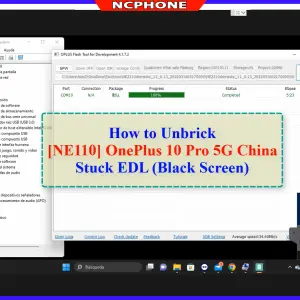
OnePlus 10 Pro NE2210 unbrick service - EDL/MSM repair
Remote OnePlus 10 Pro unbrick service for NE2210, NE2211, NE2213, NE2215 and…
-
Unlock Region OnePlus Ace 3V PJF110 Services
Fix You are using a region customized phone realme. Please contact your…
-
Unbrick OnePlus Nord CE 3 Lite Services
How to Unbrick OnePlus Nord CE 3 Lite CPH2465 Firmware. Official Flash…
Reviews
There are no reviews yet.