
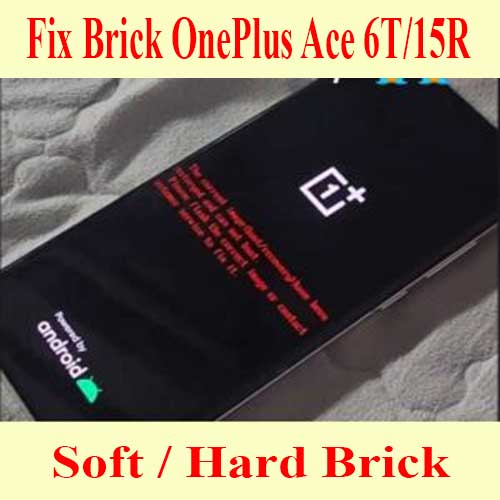
OnePlus Ace 6T / 15R unbrick service – PLR110 / CPH2769
$100
Remote OnePlus Ace 6T PLR110 and OnePlus 15R CPH2769/CPH2771 unbrick service for bootloop, EDL black screen, failed flash, Fastboot loss and firmware repair.
Service process
How this remote service works
Product details
Technical Guide
Description
OnePlus Ace 6T / 15R unbrick service
Use this service when an Ace 6T or 15R cannot boot normally after flashing, rooting, OTA failure, firmware mismatch or EDL repair attempts.
- Supported checks include PLR110, CPH2769 and CPH2771 connection state, firmware target and repair eligibility.
- For a PLR110-only repair page, see OnePlus Ace 6T unbrick service.
- If the phone boots but calls are blocked, use OnePlus Ace 6T region unlock service.
- Read the Ace 6T status 2 guide before ordering if the phone is not bricked.
OnePlus Ace 6T (PLR110) , 15R (CPH2769, CPH2771) Unbrick Service
Note: Prices may change at any time and always reflect the best available rate when you place your order.
📥 Download Unbrick ROM – OnePlus Turbo 6 (PLU110)
Device: OnePlus Ace 6T
Model: PLR110
Device: OnePlus 15r
Model: CPH2769, CPH2771
PLR110domestic_11_16.0.3.501CN01_2026010802070827 : Download
PLR110domestic_11_16.0.5.702CN01_2026031023440000 : Download
CPH2769GDPR_11_16.0.2.401EX01_2025123102320000 : Download
CPH2771export_11_16.0.2.401EX01_2025123102310632 : Download
-
🔧 Why Choose Our OnePlus Ace 6T/15R Unbrick Service?
With over 5 years of real-world experience, we specialize in recovering OnePlus Ace 6T/15R devices affected by serious software failures such as bootloop, stuck on logo, black screen, or hard-brick issues.
Our professional technical team delivers secure worldwide remote support through NCUNLOCK.COM, ensuring each repair is handled safely and precisely.
✅ Risk-free guarantee – receive a full refund if we’re unable to successfully restore your OnePlus Turbo 6.
⏱️ Most repairs are completed within 10–30 minutes, depending on device condition and internet stability.
📡 Compatible with all carriers and regions.
🛠️ How the OnePlus Ace 6T/15R Unbrick Process Works
-
Purchase the OnePlus Ace 6T/15R unbrick service on our website.
-
Contact our support team using the communication details provided after checkout.
-
Download and install Ultraviewer for secure remote desktop access.
-
Send us a screenshot of your order number and payment confirmation.
-
Our technician will remotely perform the unbrick procedure and restore your device to full working condition.
📌 Requirements for Unbricking OnePlus Ace 6T/15R
-
A Windows-based PC or laptop
-
Stable internet connection
-
High-quality USB data cable (original OnePlus cable recommended)
-
A USB 3.0 port for maximum connection stability
-
Ultraviewer installed for remote assistance
🔄 Refund Policy
-
100% refund if our server is unavailable or we cannot unbrick your OnePlus Ace 6T/15R
-
No refund if the device becomes bricked again due to user actions after repair
-
No refund if the unbrick process is interrupted by PC shutdown, power loss, or unstable connection
-
Product details
Compatibility
Additional information
| Model | OnePlus Ace 6t, OnePlus 15R |
|---|
Product details
Customer Reviews
5 reviews for OnePlus Ace 6T / 15R unbrick service – PLR110 / CPH2769
Please log in to post a review.
Related products
-
Unlock Call Block OPPO K12 - Region Customized Phone Issue
Fix You are using a region customized phone realme. Please contact your…
-
Unlock Region OnePlus Ace 3V PJF110 Services
Fix You are using a region customized phone realme. Please contact your…
-
OnePlus Nord 3 5G unbrick service - CPH2493 / CPH2491
Remote OnePlus Nord 3 5G unbrick service for CPH2493, CPH2491 and PHP110…
-
Unbrick OnePlus Nord 2 5G DN2101 Services
How to Unbrick OnePlus Nord 2 5G DN2101 Firmware. Official Flash File…
OnePlus Ace 6T –
very good
bubdujdb –
I have checked the download section and confirm that I need this file
veaneas –
I have followed the technical guide and want to continue to the download
Adam –
I have read the device instructions and confirm that I need this file
peshokalibrata –
I have followed the technical guide and confirm that I need this file