

OnePlus 15 region unlock service – PLK110 status 2 fix
$25
Remote OnePlus 15 PLK110 region unlock service for status 2, call block, SIM restrictions and China-region lock checks, handled by NCUnlock through UltraViewer.
Service process
How this remote service works
Product details
Technical Guide
Description
OnePlus 15 region unlock service for PLK110 status 2
This service is for OnePlus 15 PLK110 devices with region lock, call block, status 2, or China-region restrictions that block normal global use.
- NCUnlock checks the region status and unlock eligibility before starting the remote service.
- Read the OnePlus 15 region lock status 2 guide if you need to confirm the lock state before ordering.
- If the phone also needs OxygenOS or Global ROM conversion, see OnePlus 15 China ROM to OxygenOS service.
- If the phone is bootlooping, black screen or stuck in EDL, use OnePlus 15 unbrick service.
Why Unlock Your OnePlus 15?
-
Use any SIM card worldwide – Say goodbye to carrier restrictions.
-
Access region-locked features – Enjoy the full power of your OnePlus 15 anywhere.
-
Boost resale value – Unlocked devices attract more global buyers.
-
Switch carriers freely – Choose the best plans without limitations.
Keywords: oneplus 15 unlock | oneplus 15 region unlock | unlock oneplus 15 global
How Our OnePlus 15 Unlocking Service Works
-
Remote Unlock – 100% online process, no need to ship your phone.
-
Official Method – Safe, secure, and warranty-preserving.
-
Fast Completion – Most unlocks finished within 30 minutes.
-
All Variants Supported – China, India, North America, EU, Asia & Global versions.
Who Can Use This Service?
Whether your OnePlus 15 was purchased in China, India, or the U.S., our remote region unlock works for nearly all variants.
Simply share your IMEI and model number – we’ll handle the rest.
100% Safe & Guaranteed Unlock
Refund Policy
We offer a 100% money-back guarantee if:
-
Your OnePlus 15 cannot be unlocked remotely.
-
The official unlock server fails.
-
You cancel before the unlock process starts.
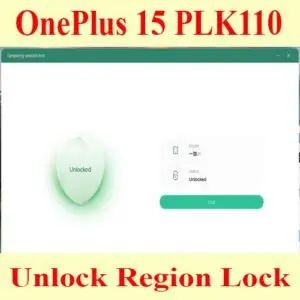
How the remote region unlock works
This service checks the region lock status of a China-market phone and removes call, SIM or network restrictions where the model and status are supported. Support reads the lock status first and only then quotes the job.
Steps
- Send your model details and describe the problem.
- Support confirms compatibility, scope and price.
- Install UltraViewer or AnyDesk on a Windows PC and connect the phone with a good USB cable.
- A technician completes the job remotely while you watch. You never ship the phone.
What to send
- A screenshot of Settings → About phone, or the model number from the box if the phone does not boot.
- What happened before the problem (update, flashing, root, relock) and the result you want.
Read first: How to check region lock status and which service you need. Questions? Contact NCUnlock on Telegram or WhatsApp.
Product details
Customer Reviews
3 reviews for OnePlus 15 region unlock service – PLK110 status 2 fix
Please log in to post a review.
Related products
-
Unbrick OnePlus 11 Services
Unbrick OnePlus 11 5G – PHB110, CPH2447, CPH2449, CPH2451 Use Auth Flash…
-
Unbrick OnePlus Nord 2T Services
How to Unbrick OnePlus Nord 2T CPH2399 Stock Firmware ROM (Flash File).…
-
Unbrick OnePlus Nord CE 2 Lite Services
Unbrick OnePlus Nord CE 2 Lite Services
-
OnePlus Nord 3 5G unbrick service - CPH2493 / CPH2491
Remote OnePlus Nord 3 5G unbrick service for CPH2493, CPH2491 and PHP110…
Stephen H –
Service is legit. My ace 5 racing edition was locked to China and after ~30 mins process now is all good and can make and receive calls
Semo –
This is legit, very skilled , not too fast or slow job done
cathy –
my phone is unlocked. i am very satisfied