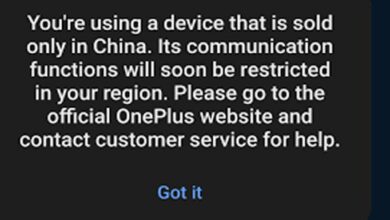

Unlock Bootloader – Convert OnePlus Ace 6T China to Global OnePlus 15R

The OnePlus Ace 6T sold in China runs a modified China ROM with local apps, limited Google integration, and certain regional differences. For international users, converting the China ROM to a Global ROM using OnePlus 15R firmware provides a cleaner, more stable experience with full Google services and international features. This process is commonly referred to as the OnePlus Ace 6T China to Global ROM. To effectively perform the conversion of the OnePlus Ace 6T China to Global ROM, it’s important to follow the necessary steps outlined in this guide.
This guide explains everything you need to know before converting: requirements, warnings, preparation, and the complete Fastboot flashing process.
⚠️ Note: Firmware download links will be added later once the official OnePlus 15R Global Fastboot package becomes available.
PLR110 Firmware:
What Is the Difference Between OnePlus Ace 6T China ROM and Global ROM?
Steps to Convert OnePlus Ace 6T China to Global ROM
Many users are interested in the OnePlus Ace 6T China to Global ROM conversion due to its benefits and improved functionality.
The original China ROM includes:
-
ColorOS–based interface
-
Chinese system apps
-
Limited Google services
-
Features designed for the China market
Meanwhile, the Global ROM (expected for OnePlus 15R):
Understanding the advantages of converting the OnePlus Ace 6T China to Global ROM can help users make informed decisions.
-
Runs a cleaner OxygenOS–style interface
-
Includes full Google Play Services
-
Supports more system languages
-
Offers better international compatibility
Converting to the OnePlus 15R Global Firmware gives your OnePlus Ace 6T a more universal software environment.
By converting your device, you embrace the full potential of the OnePlus Ace 6T China to Global ROM, enhancing your overall experience.
Important Warning Before You Start
Flashing ROM through Fastboot can be risky. You should proceed only if you understand these points:
-
Bootloader unlocking will wipe all data
-
Flashing incorrect firmware may brick your device
-
You may void warranty
-
Some network bands depend on hardware and won’t change
-
Relocking the bootloader incorrectly may cause bootloop
Users should be aware of the risks associated with the OnePlus Ace 6T China to Global ROM conversion and proceed carefully.
Always back up your photos, files, and apps before continuing.
Requirements Before Converting China ROM → Global ROM
To flash the OnePlus 15R firmware onto your OnePlus Ace 6T, prepare the following:
1. Windows PC
Windows is required for ADB/Fastboot flashing.
2. USB-C Cable
Use a high-quality cable, preferably the original OnePlus cable.
3. Bootloader Unlocked
Bootloader must be unlocked:
-
Enable Developer Options
-
Enable OEM Unlocking + USB Debugging
- Install and submit Deeptesting : Download
-

unlock bootloader oneplus ace 6T - (It will take about 1 day to be approved.) Run deeptesting app then click “Strart Deeptesting”
-
Connect to PC and run:
This will factory reset your device.
In summary, the OnePlus Ace 6T China to Global ROM conversion offers significant improvements for users looking for a better experience.
Frequently Asked Questions (FAQ)
1. Does converting ROM remove region lock?
No. Region lock is different from firmware. ROM conversion alone will not remove regional restrictions.
2. Can I relock the bootloader after conversion?
Only if the firmware exactly matches your device.
Incorrect relocking may brick the phone.
3. Will 5G bands change after Global ROM?
No. Network bands depend on hardware, not firmware.
Ultimately, converting your device to the OnePlus Ace 6T China to Global ROM can greatly enhance its functionality.